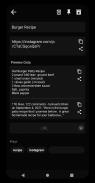
Meet QuickCopy: Clipboard Manager, your go-to solution for effortless clipboard organization. Store text, images, and links, then instantly copy or route them to apps like WhatsApp, Telegram, SMS, email, or your phone—even share images with ease. Extract captions and visuals from Instagram, Twitter, or websites for quick edits or sharing. Safeguard your clips with automated or manual Google Drive backups, secured by optional password encryption. Protect access via PIN or fingerprint, pin crucial items to your notification bar, or export data as JSON, TXT, XLSX, and DOCX files. Prefer offline backups? Simply use JSON files. Transform your workflow with QuickCopy—download today! Share feedback at [email protected].
QuickCopy: Clipboard Manager elevates productivity with these six powerful tools:
- Universal Clipboard: Handle text snippets, images, and web links effortlessly—copy instantly or smartly redirect content to target apps.
- Smart App Routing: Dispatch clips seamlessly to messaging platforms (WhatsApp, Telegram), SMS, email, or image-sharing tools in just one tap.
- Content Extraction: Pull text and graphics from social posts or webpages—edit, share, or repurpose extracted content on the fly.
- Visual Clipboard: Snap or paste images directly into QuickCopy for instant sharing or storing alongside your text clips.
- Secure Cloud Sync: Back up to Google Drive automatically or manually, with military-grade password protection for sensitive data.
- Premium Extras: Lock screens via PIN/fingerprint, pin frequent clips to notifications, export to Office formats, or opt for JSON backups without cloud storage.
Simply put, QuickCopy isn’t just a clipboard—it’s your productivity command center. From app integrations to ironclad security, experience next-level efficiency today!
Tags : Productivity